

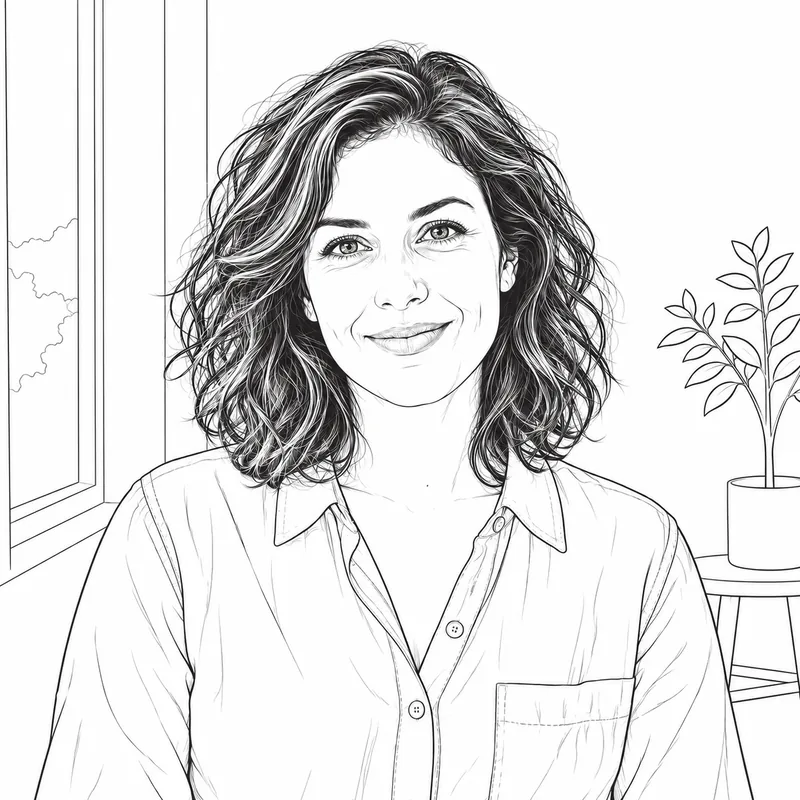
Same portrait, two weights
Classic Line keeps a limited set of interior marks; Minimal Outline uses fewer marks and leaves more white space. Pick by how much structure your project needs.


Photo to line drawing in a few steps: upload a picture, choose how much detail and line weight you want, then generate, compare it with the original, and download the result. The output is a raster image meant as clean line work to build on.
Examples are illustrative. Two compare presets on one portrait, and one shows a building. Your own photo and preset choice will change how much detail comes through.
Classic Line keeps a limited set of interior marks; Minimal Outline uses fewer marks and leaves more white space. Pick by how much structure your project needs.
Detailed Line adds interior contours and texture. Bold Outline gives the main boundaries more weight and reduces small interior marks. Compare both at the size you plan to use.


Straight edges, windows, and doorways give an outline plenty to follow. The result is a drawn interpretation of the facade, not a measured plan.


Start here for a balanced interpretation of an everyday photo. Clean contours describe the subject, while a limited number of interior marks preserve identifying details. Choose a well-lit picture with visible edges and a clear expression. Small textures are simplified so the result remains readable without filling every surface with lines.
Choose this preset for architecture, pets, clothing, or objects with important interior structure. More individual contours can describe windows, folds, fur groups, and overlapping parts. A sharp source image helps distinguish those details. Busy scenes may produce more complex line work, so review the result at full size before downloading.
Use stronger contours when you want a graphic interpretation with clear boundaries. Simple objects and subjects separated from their surroundings are useful starting points. The preset reduces small interior marks while emphasizing major shapes. Check fine features before printing; the generated raster image is a creative reference, not a production-ready stencil.
Try this preset for a quiet outline with generous white space. It uses fewer marks for texture and concentrates on the shapes that identify the subject. Clear silhouettes work especially well as inputs. Fine textures and background elements are removed to emphasize the subject while retaining its identity and overall shape.
People use these words loosely, and this tool covers all three. A picture to outline result keeps just the silhouette and the main shape boundaries. Line art is the umbrella term for anything built from lines. A line drawing adds interior marks so the subject stays recognizable.
The presets map to that range: Minimal Outline leans toward a pure outline, Classic Line gives balanced line art, and Detailed Line is the fullest drawing. Want graphite shading instead of lines? See Photo to Sketch.
Pick a sharp photo with a clear subject, and crop distracting surroundings before uploading.
Minimal and Bold give the simplest results; Classic and Detailed keep more structure. Selecting a preset does not start a generation.
Sign in with Google, select Convert to Line Drawing, then hold the comparison control to check against your original.
Save the image and finish it in your own editor, embroidery, or engraving software.
Line work is a starting point for many projects. The tool does not grant or check rights in the image you upload, so use pictures you have the right to edit.
Designers can use an outline as a base layer to redraw, simplify, or color in their own software. Starting from a clean contour saves the first pass of sketching out shapes.
Bring an outline to a conversation with your artist to show the shapes you like. It is a reference, not a stencil, and the artist will redraw it for skin and placement.
A clear outline is easier to digitize or hand-trace than a photograph. The result is a raster picture, so stitch files and thread choices still need to be prepared separately.
Bold Outline and Minimal Outline give high-contrast line work that is a reasonable starting point for engraving projects. You will need to convert it to a vector in your own software and check line widths against your machine.
Light outlines make good backdrops for hand lettering, greeting cards, and invitations. Print one on plain paper first and check that the thinnest lines survive.
Use the outline of a pet or building as a guide when you practice proportions, then draw your own version alongside it.
If the output will be shrunk, stitched, or engraved, try Bold Outline or Minimal Outline. If you want to keep texture and interior shapes, try Detailed Line.
Soft focus and heavy shadows create hesitant lines. A subject that is clearly lit from the front or side usually gives cleaner contours.
Hedges, patterned walls, and cluttered desks add lines you will have to ignore or erase. Crop tightly in another editor before uploading, since this page has no crop tool.
Eyes, text, and thin parts can shift because the result is redrawn rather than traced. Zoom in, then view the drawing at the size you will actually use.
Hold the comparison control to flip to your photo and see what the outline kept. If a key detail is gone, try another preset or a closer crop.
Upload a JPG, PNG, or WebP file, pick one of the four presets, sign in with Google, and select Convert to Line Drawing. Compare the result with your original before downloading. Switching presets does not generate anything on its own; each new version uses 1 credit.
The terms overlap. An outline traces only the outer silhouette and the main shape boundaries. Line art is the broad term for any image made of lines. A line drawing usually adds interior marks such as folds, windows, or fur groups so the subject stays recognizable. Minimal Outline sits closest to a pure picture-to-outline result; Detailed Line sits closest to a full line drawing.
No. The result is a raster image (PNG, JPEG, or WebP), not an SVG, and it is a new interpretation of your photo rather than a measured tracing. For cutting, engraving, or stitch digitizing you would need to vectorize and clean it in separate software.
There is no preset made for those uses, so try a couple and judge the lines at the size you need. Bold Outline and Minimal Outline give the fewest, clearest marks. Detailed Line keeps more interior structure but is busier. Treat the output as a reference to work from, not a finished stencil.
Yes. Sign in with Google for 3 free drawings every day, reset at 00:00 UTC and not carried over, or try once without an account. Free drawings are for personal use. After that each generation uses 1 credit. See Pricing for credit packs and Pro.
JPG, PNG, and WebP images up to 15 MB. Hold the comparison control to see your original, then release it to return to the drawing. The file arrives as PNG, JPEG, or WebP at the pixel size it was generated; there is no fixed output size, so check the lines at your target size.
Upload your picture, choose a line drawing style, and create your own line art online.